How to Generate QR Codes for Exhibitions: Track Booth Visitors 2026
Why Generate QR Codes for Exhibition Stands
Exhibition marketing feels like throwing money into a black hole. You know people visited your booth, but you can't measure what actually drove interest.
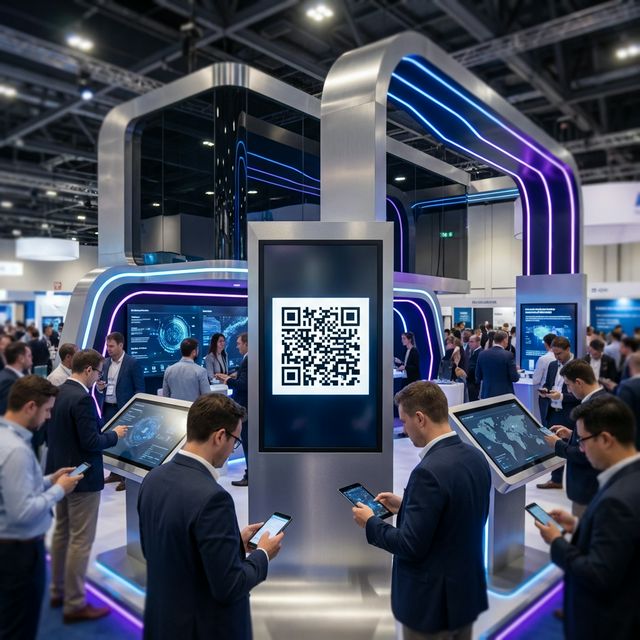
When you generate trackable QR codes for exhibitions, you see:
- 👥 How many visitors scanned your booth materials
- 🏷️ Which products or services got the most attention
- ⏱️ What times during the exhibition were busiest
- 🌍 Where visitors are from (city and country)
- 📞 Who to prioritize for post-show follow-up
Generate QR codes for your exhibition stand using Track Your QR to turn booth visits into measurable data.
How to Generate QR Codes for Exhibitions (Step-by-Step)
Step 1: Plan What You'll Track at Your Exhibition
Before you generate exhibition QR codes, decide what matters:
- Product demonstrations - Which products interest visitors most?
- Brochure downloads - Who wants detailed information?
- Contact collection - Who's ready for sales follow-up?
- Video content - Are visitors watching your demos?
- Pricing requests - Who's seriously considering purchase?
Create a landing page for each trackable element. For complete multi-track venue architecture, consult our master guide on how to use QR codes for events.
Step 2: Generate Your Exhibition QR Codes
- Sign up at Track Your QR (free to generate exhibition QR codes)
- Click "Create QR Code"
- For each booth element, paste relevant URL
- Label clearly: "Product A Demo," "Booth Brochure," "Contact Form"
- Customize with your brand using custom QR design tools
- Download all your exhibition QR codes for printing
Generate separate QR codes for different booth areas to track engagement by section. For counter lead capture tactics, see our field guide to the event booth QR code generator.
Step 3: Place QR Codes on Exhibition Materials
Once you generate QR codes for your exhibition, place them on:
- Booth banners - Large QR code (palm-sized minimum) for general information
- Product displays - Individual QR codes next to each product for detailed specs
- Staff badges - Digital business card QR codes for instant contact sharing
- Handouts - QR codes on brochures linking to digital resources
- Demo screens - QR codes after presentations for follow-up content
Use exhibition QR templates designed for trade show environments.
Step 4: Track Exhibition Performance in Real-Time
During the exhibition, log into your QR marketing analytics dashboard to see:
- Live scan counts: How many visitors engaging with each display
- Peak activity times: When your booth is busiest
- Product interest: Which items get the most scans
- Geographic data: Where visitors are traveling from
- Engagement duration: How long visitors spend on content
Adjust your booth strategy in real-time based on what's working.
Best Practices to Generate Effective Exhibition QR Codes
Test Different Booth Layouts
Generate unique QR codes for left side displays versus right side displays. See which booth area attracts more visitor attention and optimize your layout for future shows.
A/B Test Your Follow-Up Offers
Generate exhibition QR codes with A/B testing to split visitors between two follow-up offers. Test which converts better: immediate discount versus free consultation.
Route International Visitors
Generate smart exhibition QR codes that detect visitor location. Send UK visitors to .co.uk site, US visitors to .com—automatically with rule-based routing.
Update Content During the Show
Since you generated dynamic QR codes, update landing pages between exhibition days without reprinting materials. Day one feedback can improve day two content using dynamic QR codes.
Common Exhibition QR Code Uses
🚀 Product Demos
Generate QR codes for product demos — Track which products generate the most interest during the exhibition.
📝 Booth Registration
Generate booth registration QR codes — Collect visitor contact info for seamless post-show follow-up.
📋 Exhibition Brochures
Generate exhibition brochure QR codes — Reduce printed materials cost, track digital resource downloads.
🤝 Staff Contact
Generate staff contact QR codes — Share team member details instantly with prospective clients.
📊 Exhibition Surveys
Generate exhibition survey QR codes — Gather feedback while visitors remember their booth experience.
🎁 Prize Draws
Generate prize draw QR codes — Collect leads effectively through engaging contest entries.
Measuring Exhibition ROI with QR Codes
Traditional exhibition metrics don't show real engagement. When you generate QR codes for exhibitions, you measure:
- Scan Rate: Actual visitors who took action versus foot traffic
- Cost Per Lead: Exhibition cost divided by qualified leads from scans
- Product Interest: Which offerings resonate with your target audience
- Follow-Up Priority: Who to contact first based on engagement level
- Show Comparison: Compare performance across different exhibitions
This turns exhibition spending from expensive guessing into trackable investment.
Post-Exhibition Follow-Up Strategy
After the exhibition, your QR code data shows:
- High-priority leads: Scanned multiple booth QR codes and spent time on content
- Medium-priority: Scanned once or twice, showed some interest
- Low-priority: Quick scan with immediate bounce
Personalize follow-up based on which exhibition QR codes each visitor scanned. If they scanned Product A demo QR code, reference that specific product in your email.
Frequently Asked Questions
Q: How do I generate QR codes for my exhibition booth?
Sign up at Track Your QR, create separate QR codes for each booth element (products, brochures, contact forms), customize with your branding, and download for printing on banners, displays, and handouts.
Q: Can I track which exhibition visitors scanned my QR codes?
Yes. When you generate trackable exhibition QR codes, your dashboard shows scan counts, visitor locations, scan times, and engagement duration. You'll see patterns showing who's seriously interested.
Q: Should I generate one QR code or multiple for my exhibition stand?
Generate multiple QR codes for different booth sections. This lets you track which products, services, or content areas generate the most visitor interest individually.
Q: How big should exhibition booth QR codes be?
Minimum 3cm x 3cm (about 1.2 inches) for table displays. Larger for booth banners—palm-sized or bigger so visitors can scan from a few feet away.
Q: Can I generate QR codes that work for both local and international exhibition visitors?
Yes. Generate smart QR codes with rule-based routing that automatically detect visitor location and send them to region-appropriate content or websites.